

If you are using Raxi Win and experience a login problem, account-access issue, game error, or transaction-related question, knowing where to look for help can save time. The Raxi Win Customer Support section is intended to help users understand the available support options and what information they should prepare before requesting assistance.
This guide explains how users can approach common support situations while keeping their account information secure.
How to Get Raxi Win Customer Support?
The safest approach is to check the Raxi Win platform’s available Customer Support, Live Chat, or Help Center options. Choose the support method shown through the platform rather than relying on random phone numbers or unofficial social-media accounts.
Before contacting support, keep your Raxi Win user ID and a short description of the problem ready. If requested, you can also provide a screenshot of the error.
Common Issues Users May Need Help With
- Login: Password or account-access problems
- OTP: Verification or delayed-code issues
- Games: Loading or technical problems
- Account: Profile or access-related questions
- Transactions: Questions about payment status or account activity
How to Use Raxi Win Customer Support?
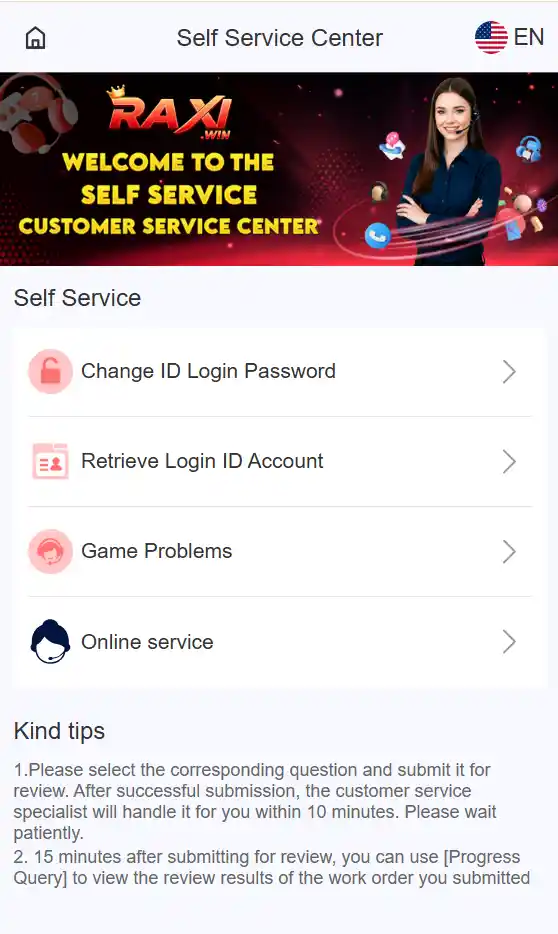
If you are facing a problem with your Raxi Win account or a game, the Self Service Center provides different options depending on the type of issue. Follow these steps to submit your request correctly.
Step 1: Open the Self Service Center
Open the Raxi Win support/self-service section and look for the Self Service menu. You will see options such as:
- Change ID Login Password – for changing your login password.
- Retrieve Login ID Account – for login ID/account recovery.
- Game Problems – for issues occurring while using a game.
- Online Service – for other available support services.
Choose the option that best matches your problem.
Step 2: Select “Game Problems” for Game Issues
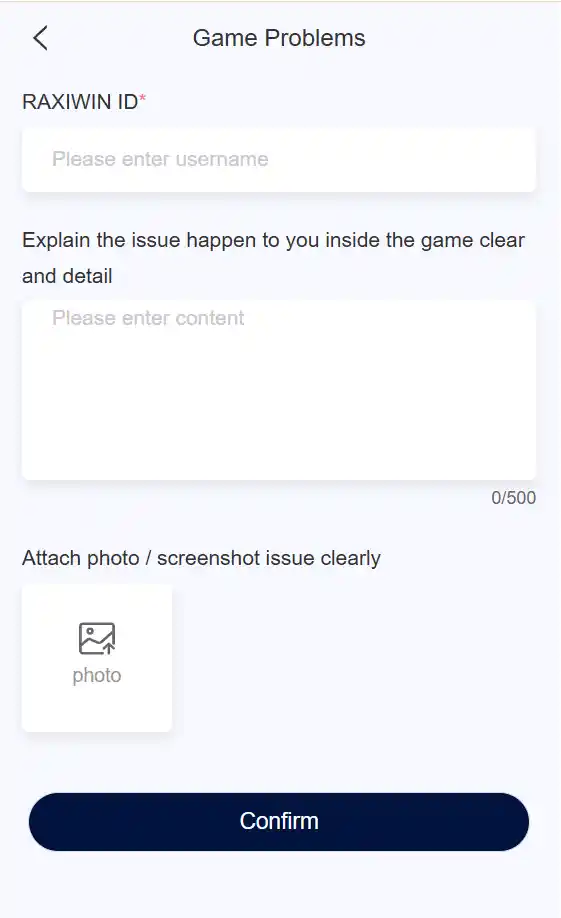
If your problem is related to a game, tap Game Problems.
This opens a support form where you can submit details about the issue instead of repeatedly trying to fix the same problem yourself.
Step 3: Enter Your RAXIWIN ID
The form asks for your RAXIWIN ID.
Enter the correct username/ID associated with your account. Double-check it before submitting so the support team can identify the relevant account.
Step 4: Explain the Problem Clearly
Use the message box to describe exactly what happened.
For example:
“The game is not loading after I open it. I tried refreshing the page, but the problem is still appearing.”
Include useful details such as:
- Which game has the problem
- What happened
- When the problem started
- Any error message displayed
- What troubleshooting steps you already tried
Avoid sharing your password, OTP, PIN, or other sensitive security information.
Step 5: Attach a Screenshot
The Game Problems form also provides an option to attach a photo or screenshot.
If an error appears on your screen, adding a clear screenshot can help explain the issue more accurately. Make sure the screenshot does not expose passwords, OTPs, payment details, or other private information.
Step 6: Submit the Request
After checking your RAXIWIN ID and issue description, tap Confirm to submit the request.
The support page shown in your screenshot also indicates that users can later check the status of a submitted request through the available progress/query option.
Which Support Option Should You Choose?
| Your Problem | Option to Select |
|---|---|
| Want to change your login password | Change ID Login Password |
| Can’t access/retrieve your login ID | Retrieve Login ID Account |
| Game isn’t working properly | Game Problems |
| Need another available support service | Online Service |
Quick Tip
Choose the correct support category, explain your issue clearly, and attach a relevant screenshot when necessary. This gives the support team useful information without requiring you to repeatedly submit the same request.
Be Careful With Fake Raxi Win Customer Support Numbers
Searching for “Raxi Win customer support number” may return unofficial websites, social-media profiles, or individuals claiming to provide support.
Users should verify contact information before communicating with anyone. A genuine support representative should not ask you to reveal your password, OTP, PIN, or other confidential security information.
Never send money to someone simply because they claim they can unlock an account or resolve a technical issue.
What Information Should You Prepare?
When contacting support, having the following information available can help:
- Raxi Win user ID, if applicable
- Description of the problem
- Approximate time the issue occurred
- Device or browser being used
- Relevant error message
- Screenshot of the issue, if appropriate
Keep sensitive authentication and payment information private.
Final Thoughts
Raxi Win users may encounter login, account, game, or technical issues from time to time. The best approach is to identify the problem, check basic troubleshooting steps, and use the platform’s currently available legitimate customer-support channel when additional assistance is required.
For your safety, avoid unverified support numbers and never share passwords, OTPs, PINs, or payment credentials with third parties. Availability of support channels can change, so always verify the latest information through the platform itself.
Faq:
Open the Raxi Win Self Service Center and select the support option that matches your issue, such as Game Problems, account recovery, or Online Service.
Choose Game Problems, enter your RAXIWIN ID, explain the issue clearly, and attach a screenshot if it helps show the error.
Provide your RAXIWIN ID and a clear description of the problem. Avoid sharing your password, OTP, PIN, or payment credentials.
Yes. The Game Problems form provides an option to attach a photo or screenshot. Make sure it does not contain sensitive information.
Use the Retrieve Login ID Account option in the Self Service Center and follow the instructions provided by the platform.
Select Change ID Login Password from the Self Service Center and follow the platform’s password-change process.
According to the support interface, users can use the available Progress Query option to check the status of a submitted request.
No. Never share your password, OTP, PIN, or payment credentials with anyone claiming to be customer support.